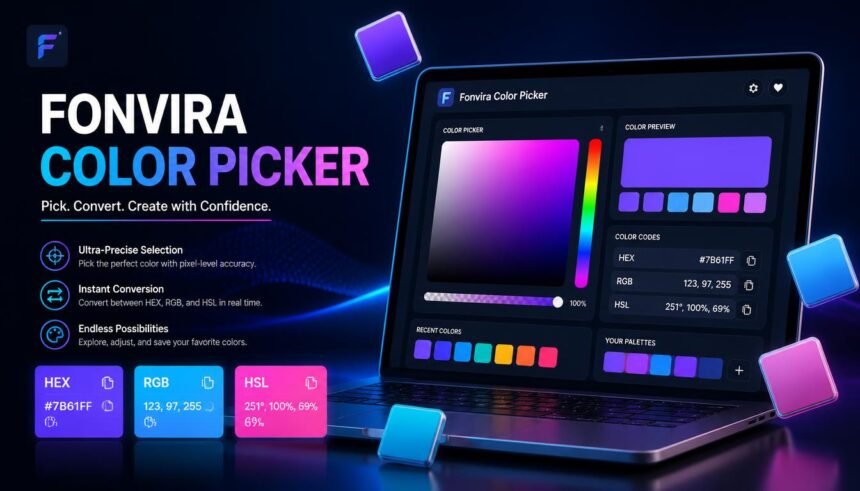
Choosing the right colors is an important part of creating an attractive website, consistent brand identity, or easy-to-use digital interface. However, selecting a color visually is only one part of the process. Designers and developers also need accurate color codes that can be transferred into stylesheets, design applications, and other digital projects.
Fonvira is a browser-based color picker and converter designed to make this process simpler. It allows users to select a color or enter a HEX value, view corresponding color representations, and copy the values they need for their work. Its main focus is convenience rather than providing a complete graphic design environment.
In this review, we will explore how Fonvira works, its main features, the differences between its supported color formats, its potential benefits for designers, and the limitations users should understand before relying on it for professional projects.
What Is Fonvira?
Fonvira is an online color-selection utility that helps users work with common digital color formats. Instead of calculating color values manually or opening a large design application for a simple conversion, users can access the tool through a compatible web browser.
The platform focuses on three widely used color representations: HEX, RGB, and HSL. These formats describe colors in different ways, but they can represent the same underlying shade. Fonvira brings these values together with a visual preview, making it easier to move from a color choice to a usable code.
For example, a web designer might select a particular shade of blue for a website button. The designer may need its HEX value for a stylesheet, its RGB representation for a development task, or its HSL representation when experimenting with related shades. A color converter helps reduce the effort involved in obtaining these different representations.
Fonvira is designed for practical, everyday color tasks rather than complex illustration, photo editing, or complete brand development. Its straightforward purpose makes it potentially useful for website owners, front-end developers, students, and digital creators who regularly work with colors.
| 🔗 You may also like: |
| What is fontlu font discovery features uses |
| Vidnoz review create stunning ai images and videos easily |
How Does Fonvira Work?
Fonvira follows a simple workflow: select a color, examine its available values, and copy the format required for your project. This approach can save time when switching between visual design decisions and technical implementation.
1. Select a Color or Enter a HEX Value
The first step is choosing the color you want to work with. Fonvira allows users to select a shade through its color-picker interface or enter a HEX value when the exact code is already known.
Visual selection can be useful during the early stages of a design, when someone is exploring possible background colors, accents, or button shades. Entering a known HEX value is more practical when following an established brand guide.
Starting with an existing code also helps maintain consistency. Rather than attempting to recreate a familiar shade by eye, users can enter the original value and work from that reference.
2. Review the Corresponding Color Formats
After a color is selected, Fonvira displays its associated HEX, RGB, and HSL values. The live preview helps users identify the shade they are working with, while the numerical representations make the color easier to transfer into another application.
This is particularly helpful when different parts of a project require different notations. A developer may use HEX in a CSS declaration, while another task may require RGB values for a particular programming workflow.
The important point is that changing the notation does not necessarily change the color itself. When the values are converted correctly, they describe the same shade using different systems.
3. Copy the Value You Need
Fonvira provides copy controls so users can transfer the relevant color value without manually selecting and retyping every character.
This small feature can be useful when working with several colors in one session. It also reduces the risk of typing mistakes in hexadecimal codes or numerical values.
Once copied, the value can be pasted into a compatible stylesheet, design tool, website editor, or code editor. Users should still confirm that the destination accepts the selected format and that the value appears in the intended part of the design.
Key Features of Fonvira
Fonvira concentrates on a small set of features that support common color-selection tasks. Understanding these functions helps explain where the tool fits into a typical design workflow.
Browser-Based Color Selection
One of Fonvira’s main advantages is that its core functionality is available through a web browser. Users do not need to install a separate desktop application just to select a color or convert its code.
This can be convenient for people working on different computers or using a browser-based website builder. It also gives beginners a simple starting point without requiring them to learn a large collection of design controls.
However, browser access does not mean that the tool replaces professional software. Projects involving detailed illustrations, image editing, or complex design systems may still require dedicated applications.
HEX, RGB, and HSL Conversion
The availability of three familiar color formats is central to Fonvira’s purpose. Each representation has a different structure and can be useful in a different context.
HEX provides a compact code that is widely used in web development. RGB describes the red, green, and blue components of a color. HSL represents hue, saturation, and lightness, which can make it easier to reason about changes in a shade.
Having these formats available together can simplify handoffs between designers and developers. It also helps beginners understand how a single color can be expressed through different numerical systems.
Live Color Preview
A numerical code can be difficult to recognize without seeing the actual shade. Fonvira’s live preview provides a visual reference as users select or enter a color.
This can help users confirm that they are working with the intended shade before copying the code. It is especially useful when comparing similar colors, such as two shades of blue that differ slightly in brightness or saturation.
Nevertheless, a preview is only a starting point. The final appearance of a color can change depending on the surrounding interface, display settings, brightness, and other visual conditions. Testing the shade in its intended design remains important.
Convenient Copy Controls
Manually copying a long or unfamiliar color value introduces opportunities for error. A missing character or incorrect digit can produce an entirely different color.
Fonvira’s copy controls are intended to make transferring values more convenient. Rather than typing each code again, users can copy the relevant representation and paste it into their project.
For teams working with established brand colors, this can also support a more consistent workflow. The copied value should still be checked against the project’s approved color specifications when accuracy is particularly important.
Free Access Without Mandatory Registration
Fonvira’s website describes its color utility as free to use, without mandatory account registration or a paid subscription for its basic functions.
This lowers the barrier for occasional users who only need a quick conversion. Students, independent creators, and small website owners can explore the tool without first setting up an account.
Free access should not be confused with a guarantee of permanent availability. Online services can change their features, policies, or operating conditions, so users who depend on a tool for regular work should keep an alternative available.
Understanding HEX, RGB, and HSL
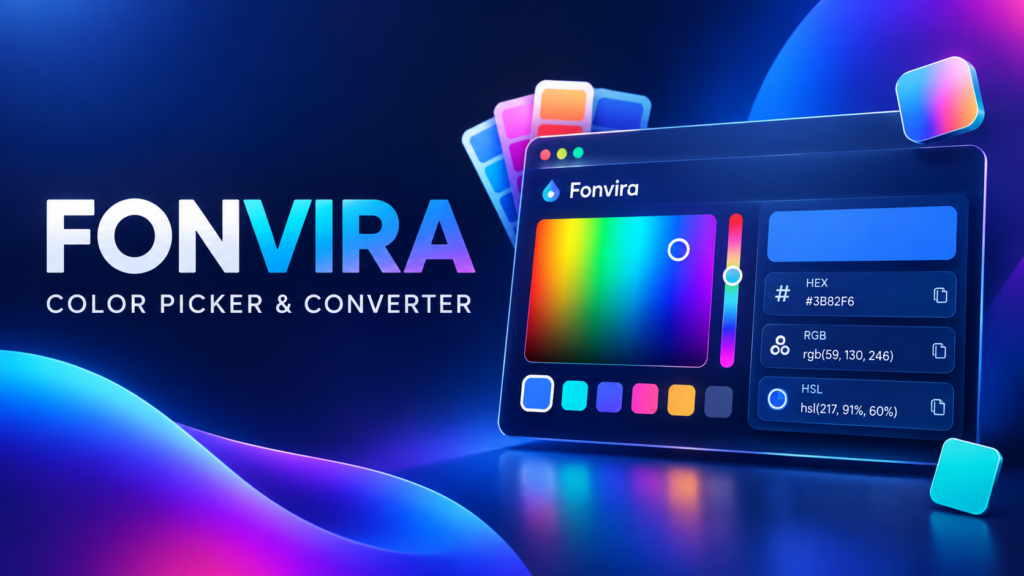
To get the most from Fonvira, it helps to understand what each supported format represents and when it may be appropriate.
What Is a HEX Color Code?
HEX is short for hexadecimal. In common web color notation, a six-digit HEX code represents the red, green, and blue components of a color using hexadecimal numbers.
For example, #2563EB represents a shade of blue. The hash symbol is followed by three pairs of characters, with each pair describing one color channel.
HEX is widely used in CSS and website design because it provides a compact way to specify colors. Designers often record brand colors in HEX format so the same values can be reused across headings, buttons, borders, and other interface elements.
What Is RGB?
RGB stands for red, green, and blue. It represents a color by specifying the intensity of each of these three channels, typically using values from 0 to 255 in the standard notation.
For example, pure red can be represented as rgb(255, 0, 0). The red channel is at its maximum, while the green and blue channels are set to zero.
RGB is useful in web development and digital graphics because it makes the individual color components explicit. CSS also supports RGB-based notation with an alpha component when transparency is needed.
What Is HSL?
HSL stands for hue, saturation, and lightness. Hue describes the general color family, saturation represents its intensity, and lightness indicates how light or dark it is.
This format can be convenient when adjusting a color while keeping its general character. A designer might retain a blue hue while increasing lightness to create a softer background or reducing lightness to develop a darker state for a button.
HSL can make these adjustments easier to reason about than changing three separate RGB channels. However, designers should still preview the resulting color and check whether it works with the rest of the interface.
Which Format Should You Use?
The best format depends on the application or task. HEX is a practical choice for many CSS declarations and brand specifications. RGB is useful when working with channel values or transparency in compatible contexts. HSL can be helpful when exploring lighter, darker, or less saturated variations.
Fonvira’s value is that users can access these representations together instead of converting them manually. The destination application determines which format is most appropriate.
| 🔗 You may also like: |
| Software discovery is broken |
| Buy or build AI agents companies |
Practical Uses of Fonvira in Digital Projects
Fonvira can support several everyday tasks, especially when a project requires precise and repeatable color values.
Website Design and Development
Website creators regularly work with background colors, text, navigation bars, buttons, borders, and links. Keeping these colors consistent helps create a more coherent visual experience.
A developer can use a color picker to identify a shade and then copy the appropriate value into a stylesheet. For example, a brand’s primary blue might be used for buttons and links, while a lighter variation is reserved for subtle background sections.
Fonvira can simplify the conversion part of this process. It does not determine where colors should be used, but it can help supply the numerical values needed to implement those decisions.
Brand Color Consistency
Businesses often define a small set of approved colors for their logos, websites, promotional materials, and digital communications. Inconsistent values can make a brand appear less polished.
Using the same documented HEX codes across relevant assets can reduce this problem. Fonvira can help users retrieve corresponding formats when a project requires them.
For the best results, businesses should maintain a central brand reference that records approved color values, intended uses, and any important accessibility requirements. A color converter supports this process but does not replace the reference itself.
UI and UX Design
User interface design involves more than choosing attractive colors. Designers must consider how colors communicate actions, separate interface elements, and support readability.
A consistent color system can help users distinguish primary buttons from secondary controls or understand which elements are interactive. Fonvira may assist when designers need to select or convert the colors used in these elements.
Before a design is finalized, however, the color combinations should be tested in realistic interface conditions. A shade that looks attractive in isolation may not work well when placed behind small text or next to other visual elements.
Learning Web Development
Beginners can use color-selection tools to understand the relationship between visual appearance and code. By entering a HEX value and examining the corresponding RGB and HSL representations, learners can see how different systems describe the same color.
This is useful during introductory CSS exercises, particularly when experimenting with headings, backgrounds, borders, and hover states.
Students should treat the tool as a practical learning aid rather than a substitute for understanding the underlying concepts. Learning what each format means makes it easier to troubleshoot styling problems later.
Digital Marketing and Content Creation
Digital marketing teams create website banners, landing pages, promotional graphics, and social media content. Reusing established colors across these assets can help maintain a recognizable visual identity.
Fonvira may be useful when a marketer has a known color reference but needs a different format for a web page or digital workflow. Its narrow focus makes it suitable for quick checks between other tasks.
For complex campaigns, teams may still need design software, shared asset libraries, and approval processes to manage layouts, typography, imagery, and brand consistency.
Fonvira’s Privacy and Accessibility Considerations
Privacy and accessibility deserve attention even when a tool performs a simple task.
What Users Should Know About Privacy
Fonvira states that its color-processing functionality operates within the browser, so the color values entered for conversion are not sent to its servers for that purpose. The site also advertises basic access without registration.
These are useful characteristics for a lightweight utility. Nevertheless, local processing should not be interpreted as proof that visiting the website generates no network activity. Websites may make requests for fonts, security services, hosting, or other supporting resources.
The published privacy policy is the appropriate place to review the operator’s current disclosures. These statements should not be treated as an independent technical audit, and policies can change over time.
For ordinary color conversion, users generally do not need to enter sensitive personal information. Anyone working under strict organizational privacy requirements should evaluate the service according to their own policies.
Color Conversion Does Not Guarantee Accessibility
A correctly converted color is not automatically accessible. The readability of a page depends on how foreground and background colors work together, as well as typography, layout, and other design choices.
For example, light gray text on a white background may be difficult to read even when both colors have valid HEX and RGB values. A dedicated contrast checker can help determine whether a text-and-background combination meets the relevant Web Content Accessibility Guidelines (WCAG) contrast requirements.
For WCAG Level AA, normal text generally requires a contrast ratio of at least 4.5:1, while large text generally requires at least 3:1. These measurements must be checked for the actual color combination rather than inferred from a color preview.
Designers should also avoid relying on color alone to communicate important information. Labels, icons, patterns, and other visual cues can help users distinguish states and understand an interface.
Limitations of Fonvira
Fonvira is most appropriate when the task involves straightforward color selection and conversion. Its focused approach is convenient, but users should not assume that it provides every feature found in a full design application.
The tool’s advertised core functions do not establish that it offers advanced palette management, collaborative brand libraries, image editing, print-oriented color workflows, or comprehensive accessibility testing. Users who need these capabilities should check the available functionality and consider complementary software.
A browser-based preview also cannot guarantee that a color will appear identical across every screen. Device calibration, display technology, brightness, and viewing conditions can influence the result.
Another consideration is that color conversion only addresses representation. It does not decide whether a shade fits a brand, creates a clear visual hierarchy, or provides sufficient contrast for users.
These limitations do not make Fonvira unsuitable for simple tasks. They help clarify when a lightweight converter is enough and when a project requires additional tools or testing.
Is Fonvira Worth Using?
Fonvira may be a practical option for users who frequently need to select colors and convert them into common web formats. Its browser-based access, live preview, and copy controls are designed to reduce friction during routine design and development work.
Beginners may find it useful for exploring HEX, RGB, and HSL values, while experienced developers may appreciate having a focused utility available for quick conversions. Website owners and content creators can also use it when working with established brand colors.
Its suitability ultimately depends on the task. A simple conversion does not require a full graphic design suite, but a professional website still needs thoughtful color choices, accessible combinations, consistent branding, and testing across relevant devices.
Users should also verify important values before deploying them in a production project, particularly when brand accuracy or accessibility is essential. Fonvira is best viewed as one small part of a broader design workflow rather than a complete solution for every color-related challenge.
Conclusion
Fonvira offers a focused way to select colors, preview shades, and convert values between HEX, RGB, and HSL formats. By bringing these common representations into a browser-based workflow, it can make routine color tasks more convenient for designers, developers, students, and website owners.
Its main appeal is simplicity. Users can obtain a color value without opening a large design application or manually calculating the corresponding notation. At the same time, it should not be mistaken for a complete design platform or an accessibility-testing solution.
For everyday color work, Fonvira may be a useful addition to a designer’s toolkit. Combining it with an organized brand palette, independent contrast checks, and testing in the final interface can help produce digital projects that are more consistent, readable, and visually effective.
FAQs
What is Fonvira used for?
Fonvira is an online color picker and converter used to select colors, preview shades, and obtain corresponding HEX, RGB, and HSL values for digital design and development tasks.
Is Fonvira free to use?
The website describes its basic color-selection and conversion functionality as free, without mandatory registration or a paid subscription. Users should review the current terms for the latest conditions.
Does Fonvira require software installation?
No separate installation is advertised for its browser-based functionality. Users can access the utility through a compatible web browser.
Can Fonvira be used for website development?
Yes. Its color values can be transferred into compatible stylesheets, website builders, and development tools. Developers should ensure the chosen format is supported by the destination application.
Does Fonvira replace professional design software?
No. Fonvira focuses on color selection and conversion. Projects requiring illustration, image editing, advanced color management, or collaboration may need dedicated design applications.
Does Fonvira automatically check color contrast?
Users should not assume that color selection and conversion constitute a full accessibility assessment. A dedicated contrast checker is recommended for evaluating text, backgrounds, and important interface components.
Can Fonvira help maintain brand consistency?
It can help users retrieve and reuse color values, which supports consistency when working from an established brand palette. A central record of approved colors remains important for larger projects.