A comfortable computer workspace requires more than a reliable mouse, a responsive keyboard, and a suitable desk. Small accessories can also influence how people interact with their equipment throughout the day. For individuals who spend extended periods working, gaming, editing, or browsing, the way their hands are positioned during mouse operation deserves particular attention.
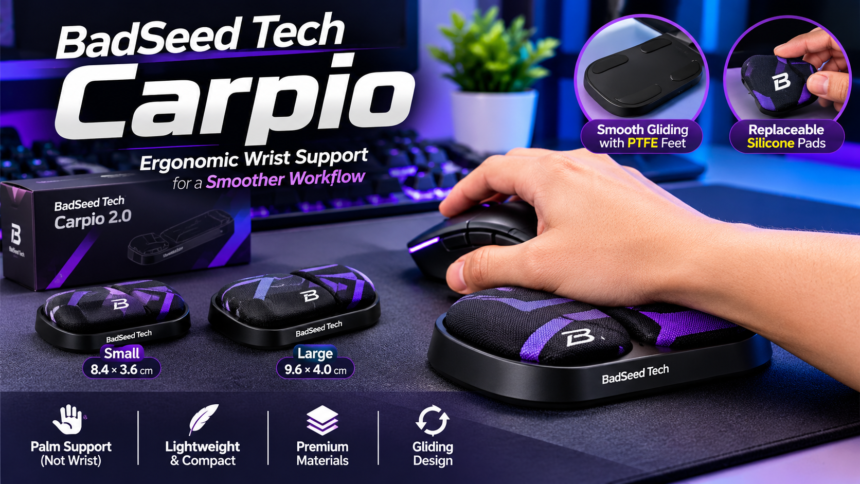
BadSeed Tech Carpio brings an interesting approach to this area through its collaboration with DeltaHub. Built around the Carpio 2.0 ergonomic wrist-support platform, this special edition combines a distinctive creator-inspired appearance with a design focused on palm support and unrestricted movement. Unlike conventional wrist rests that remain in one position, the accessory is designed to glide alongside the user’s hand as the mouse moves.
Its appeal extends beyond appearance. Compact dimensions, replaceable pads, carefully selected materials, and different sizing options make it an interesting addition to modern computer setups. Understanding how these elements work together helps explain what makes the product different and whether its design suits everyday computing needs.
What Is BadSeed Tech Carpio?
BadSeed Tech Carpio is a special-edition ergonomic mouse wrist support created through a collaboration between BadSeed Tech and DeltaHub. Rather than introducing a completely new electronic device, the collaboration applies distinctive branding and specially designed replaceable pads to DeltaHub’s existing Carpio 2.0 platform.
The product is intended to sit beneath the palm while someone operates a computer mouse. Its construction allows the support to move across the desk instead of remaining fixed like a traditional foam or gel wrist rest. This creates a different approach to supporting the hand during repeated mouse movements.
DeltaHub provides the underlying product design and mechanical components, while BadSeed Tech contributes the collaboration’s visual identity. Consequently, buyers receive the familiar Carpio concept with special-edition styling.
Several types of computer users may find this design interesting, including gamers, programmers, office professionals, designers, and content creators. Anyone researching the product should understand that its main purpose is physical workstation support rather than improving computer performance or introducing additional gaming technology.
The Design Philosophy Behind Carpio
Conventional wrist rests generally prioritize cushioning. Their materials are selected to create a comfortable surface, but their stationary construction means they do not automatically follow the user’s hand when the mouse moves.
Carpio approaches the problem from another direction. Its design focuses on keeping the palm supported while allowing the support itself to travel across the desk. This movement is the defining characteristic of the product and separates it from many traditional accessories.
The concept also reflects a broader interest in workstation ergonomics. Modern computer users frequently perform tasks that require continuous cursor movement, and their hands may travel across considerable portions of a mouse pad. A movable support provides an alternative to keeping the palm against a fixed surface throughout these activities.
DeltaHub describes the Carpio design as a way to distribute pressure away from the sensitive carpal area toward stronger areas of the palm. Although this is the intended ergonomic approach, individual experiences can differ. Comfort depends on hand position, mouse technique, desk arrangement, and personal preferences.
| 🔗 You may also like: |
| Sosoactive Guide: Lifestyle, Entertainment, Tech & Social Trends |
| Sparkpressfusion com explained |
How Does BadSeed Tech Carpio Work?
Understanding the mechanism makes it easier to appreciate the product’s practical purpose. Carpio does not depend on electronics, wireless connections, sensors, or computer software. Its operation comes from a combination of a structured base and low-friction components underneath.
A Gliding Mechanism for Natural Movement
The underside features PTFE gliding feet that help the accessory move across a suitable desk surface. PTFE is commonly used in applications where reduced friction is desirable, making it appropriate for this type of moving support.
When the user moves the mouse, the palm can remain positioned on the Carpio pads while the accessory travels with the hand. Instead of repeatedly lifting or adjusting a stationary cushion, the user can allow the support to follow the movement.
Surface compatibility plays an important role in this process. Rough materials, accumulated dust, or sticky desk surfaces may interfere with smooth movement. DeltaHub recommends compatible smooth surfaces, including felt and neoprene desk mats.
Palm Support Instead of a Fixed Wrist Position
Another important aspect involves where the hand rests. Carpio is designed to support the palm rather than encourage direct pressure against the wrist joint.
This distinction influences how the accessory should be positioned. Users should allow the palm to rest naturally on the silicone pads without pressing down excessively.
A comfortable working position also involves the elbow and forearm. Adequate support from a chair armrest or desk can complement the accessory and help create a more balanced workstation arrangement.
BadSeed Tech Carpio Features
Several design elements contribute to the product’s identity. Rather than relying on complicated technology, its functionality comes from relatively simple mechanical components and practical construction.
Distinctive Collaboration Appearance
The BadSeed Tech edition introduces a recognizable visual style to the Carpio 2.0 platform. Its black base and special-edition pad design give it a different appearance from standard color options.
For technology enthusiasts who enjoy coordinated desk accessories, this collaboration can provide an additional reason to consider the product. Its appearance is particularly relevant to users building darker gaming or productivity setups.
Replaceable Silicone Pads
Replaceable pads are another useful element of the design. The special edition includes standard pads in the selected size along with BadSeed Tech collaboration pads.
Having interchangeable components provides flexibility when users want to change the appearance of the accessory. It also means the upper pads do not necessarily need to remain in their original configuration throughout the product’s lifetime.
Low-Friction Gliding Feet
Movement is central to the Carpio experience, and the PTFE components underneath support this functionality.
Their purpose is to make the accessory glide across compatible surfaces while the hand changes position. A suitable desk mat can help maintain a more consistent experience during ordinary computer activities.
Compact Construction
Unlike full-length keyboard wrist supports, Carpio has a relatively small footprint. Its compact structure allows it to sit beside a mouse without occupying a large portion of the desk.
Portability is another practical consideration. Users who move between home, office, or study environments may find a smaller accessory easier to carry with their other computer equipment.
Materials and Construction Quality
Material selection affects the stability, comfort, and movement of an ergonomic accessory. DeltaHub uses three primary materials in the Carpio 2.0 construction, each serving a different purpose.
ABS Plastic Base
The main supporting structure is made from ABS plastic. This material provides a firm foundation for the upper pads and lower gliding components.
A structured base is important because the accessory must maintain its shape while moving across the desk. Unlike a soft cushion that changes form under pressure, the ABS construction gives Carpio a more defined structure.
Silicone Contact Pads
Silicone is used for the areas where the palm rests. Its softer surface provides the primary contact point between the user’s hand and the accessory.
The replaceable design also allows the collaboration version to introduce a different appearance without changing the main structure. Keeping these contact areas clean can help maintain their everyday usability.
PTFE Gliding Components
PTFE is used underneath the base to facilitate movement. Its low-friction characteristics support the product’s defining gliding function.
The performance of these components is influenced by the surface underneath them. A suitable mat and a reasonably clean working area can help maintain smoother movement.
BadSeed Tech Carpio Sizing Guide
Selecting the appropriate size is an important part of getting a comfortable experience. Carpio 2.0 is available in Small and Large options, offering different dimensions for different support preferences.
| Specification | Small | Large |
| Length | 8.4 cm | 9.6 cm |
| Width | 3.6 cm | 4.0 cm |
| Approximate dimensions in inches | 3.3 × 1.4 | 3.8 × 1.6 |
| Support area | Compact | Broader |
Small Size: A Compact Alternative
The Small version provides a relatively compact palm-supporting area. It may appeal to users who prefer smaller accessories or want to preserve more space around their mouse.
Its dimensions can also be useful when arranging several peripherals on a limited desk. However, a compact design should still provide enough contact area for comfortable positioning.
Large Size: Additional Supporting Space
The Large option offers a longer and wider surface than its smaller counterpart. Users who prefer a broader contact area may find this configuration worth considering.
Additional surface area does not automatically guarantee better comfort. Hand proportions, mouse position, and personal working habits remain important factors.
Making the Right Size Decision
Choosing between the two versions should involve more than general assumptions about hand size. Reviewing DeltaHub’s current sizing guide is the most reliable way to identify a suitable option.
Consider how your palm naturally rests while using a mouse and whether a smaller or broader support area feels more appropriate. A properly selected size should complement natural hand movement instead of forcing an uncomfortable position.
Setting Up BadSeed Tech Carpio Correctly
Although the accessory does not require complicated installation, its positioning can influence the overall experience. A few practical adjustments can help users integrate it into their existing workstation.
Position the Support Beside the Mouse
Start by placing Carpio on a suitable desk surface next to the mouse. Leave enough room for both accessories to move without repeatedly touching the keyboard or other equipment.
A crowded arrangement can interfere with the gliding mechanism, so adequate workspace is important.
Place the Palm on the Pads
Allow the palm to rest naturally on the silicone contact areas. Avoid treating the accessory like a fixed cushion that requires constant downward pressure.
The design is intended to provide support while allowing the hand to move freely.
Allow Natural Movement
Move the mouse normally and let Carpio follow the movement. Its mechanism is designed around this relationship between the hand and the supporting platform.
Users who are accustomed to stationary wrist rests may need a short adjustment period before the movement feels familiar.
Check Desk and Keyboard Height
Workstation alignment can affect the way the accessory feels during use. An unusually high keyboard or elevated mouse may create a difference in hand position.
DeltaHub offers optional height-adjustment accessories for situations where additional elevation is required. Users should evaluate their existing setup before purchasing extra components.
BadSeed Tech Edition vs Standard Carpio 2.0
One common purchasing question concerns the difference between the collaboration edition and the standard product.
Both versions share the same fundamental Carpio 2.0 platform. Their main distinction is the visual presentation and the included special-edition pads rather than a completely different mechanical system.
| Feature | BadSeed Tech Edition | Standard Edition |
| Core platform | Carpio 2.0 | Carpio 2.0 |
| Gliding mechanism | Yes | Yes |
| Base material | ABS | ABS |
| Palm pads | Silicone | Silicone |
| Gliding feet | PTFE | PTFE |
| Appearance | Collaboration styling | Standard color options |
| Special pads | BadSeed Tech design | Standard designs |
People who appreciate the BadSeed Tech collaboration may prefer its distinctive appearance. Buyers who are primarily interested in functionality can also compare the standard model before making a decision.
Pricing, available bundles, and stock can change between regions. Checking the current product listing is therefore more useful than relying on older promotional prices.
Who Should Consider Using BadSeed Tech Carpio?
The product is relevant to several groups of computer users, although the experience may differ depending on their activities and preferences.
Gamers and Gaming Enthusiasts
Gaming often involves repeated mouse movements, particularly in titles that require accurate cursor positioning. A gliding palm support offers a different approach to maintaining contact with the desk during these movements.
Players who enjoy coordinated peripherals may also appreciate the collaboration styling.
Office Professionals
Administrative work, spreadsheets, presentations, and document editing can involve frequent mouse interaction. A compact support accessory may become a useful part of a regular workstation arrangement.
Designers and Content Creators
Creative applications often require precise cursor movements and repeated adjustments. Graphic designers, video editors, and other digital creators may find the moving-support concept interesting when arranging their desks.
Students and Remote Workers
People who study or work from different locations may appreciate the accessory’s compact construction. It can be incorporated into a home workstation or carried alongside other computer equipment.
However, suitability should always be judged by individual comfort rather than job title alone.
Advantages and Limitations
A balanced evaluation requires looking at both the product’s strengths and the circumstances in which its design may not be ideal.
Main Advantages
- Gliding construction: The support moves alongside the hand instead of remaining fixed.
- Compact footprint: Its smaller dimensions preserve valuable desk space.
- Material combination: ABS, silicone, and PTFE serve different functional purposes.
- Two size options: Small and Large configurations provide different support dimensions.
- Replaceable pads: Users can change the upper pad design.
- No electronic requirements: The product does not need charging, software, or wireless connections.
- Special-edition appearance: BadSeed Tech styling adds a distinctive visual identity.
Important Limitations
- Surface requirements: Rough or sticky materials can interfere with smooth movement.
- Personal preferences: Some users may prefer a stationary foam or gel wrist rest.
- Workstation alignment: Keyboard and mouse height can influence the accessory’s positioning.
- Adjustment period: The gliding design may feel unfamiliar initially.
- Regional availability: Product prices, bundles, and stock can vary.
Ergonomic accessories should also be viewed realistically. Carpio is not a medical device or a guaranteed solution for wrist pain. Persistent discomfort, numbness, or weakness should be discussed with a qualified healthcare professional.
Is BadSeed Tech Carpio Worth Considering?
Whether the product represents a worthwhile purchase depends on the buyer’s expectations and existing workstation arrangement.
Its strongest characteristic is the moving-support concept. Instead of relying on a stationary cushion, it allows the palm support to travel across the desk with the user’s hand. This provides a different experience for people who want an alternative to conventional mouse wrist rests.
The collaboration styling adds another consideration. BadSeed Tech enthusiasts may appreciate the special appearance and replaceable pads, while other buyers may find the standard Carpio 2.0 equally interesting because it shares the underlying mechanism.
Before purchasing, evaluate the size, available desk space, surface compatibility, and overall price. These practical factors are more important than choosing a product simply because it has a distinctive design.
For users who appreciate compact ergonomic accessories and want to explore a movable support system, BadSeed Tech Carpio is an option worth examining.
Conclusion
BadSeed Tech Carpio introduces a distinctive interpretation of everyday mouse support by combining DeltaHub’s gliding wrist-rest design with special creator-inspired styling. Its construction focuses on palm support, smooth movement, and compact usability rather than unnecessary electronic features.
The combination of PTFE gliding components, an ABS base, and replaceable silicone pads gives the product a clearly defined purpose. Different size options also allow buyers to consider their preferred support area and workstation arrangement.
For gamers, office professionals, students, and digital creators, the accessory offers an alternative to traditional stationary wrist rests. Its practical value, however, depends on surface compatibility, hand positioning, desk height, and personal comfort.
Ultimately, BadSeed Tech Carpio stands out because of its approach to movement. By allowing the support to travel with the hand, it offers a different way to think about ergonomic mouse accessories and the everyday computer workspace.
FAQs
What is BadSeed Tech Carpio used for?
BadSeed Tech Carpio is an ergonomic wrist-support accessory designed for use alongside a computer mouse. It supports the palm and moves with the user’s hand across a suitable desk surface.
Who manufactures the Carpio product?
DeltaHub develops and manufactures the Carpio platform. The BadSeed Tech version is a special creator collaboration featuring distinctive styling and replaceable pads.
Does BadSeed Tech Carpio require software?
No. Its operation is entirely mechanical. There are no batteries, Bluetooth connections, USB requirements, or software installations.
What are the main materials?
The Carpio 2.0 platform uses an ABS plastic base, silicone palm pads, and PTFE gliding components.
What is the difference between Small and Large?
Small measures approximately 8.4 × 3.6 cm, while Large measures approximately 9.6 × 4.0 cm. The larger option provides a broader support area.
Can it be used with any mouse?
It is designed as a mouse wrist-support accessory and can be considered for different mouse setups. However, compatibility and comfort depend on positioning, available space, and relative device height.
Does the support move with the hand?
Yes. Its defining feature is a gliding base that allows the support to travel alongside the user’s hand during mouse movement.
Is it suitable for long computer sessions?
It may be suitable for people who prefer its moving-support design, but comfort varies between individuals. Appropriate workstation positioning remains important.
Is the BadSeed Tech version different from the regular model?
Its main differences are the special collaboration appearance and replaceable pads. The underlying Carpio 2.0 platform remains the same.
Can it treat carpal tunnel syndrome?
No. It is an ergonomic accessory, not a medical treatment. Anyone experiencing persistent symptoms should consult a qualified healthcare professional.