
Instagram Stories have become an important way for businesses, creators, and brands to share updates, introduce products, and connect with their audiences. However, Stories are primarily designed for Instagram users, which means website visitors may never see this content unless they visit the social platform. EmbedSocial offers a solution by allowing businesses to display Instagram Stories directly on their websites through an embeddable widget.
The EmbedSocial Instagram Story Viewer is best understood as a website integration tool rather than a traditional anonymous story-viewing website. It helps users showcase their own Instagram Stories in an interactive format that visitors can explore without leaving the website. This can be useful for online stores, service businesses, bloggers, agencies, and other organizations that want to bring social media content into their websites.
In this guide, we will explore what EmbedSocial Instagram Story Viewer does, how its main features work, the benefits it offers, how to set it up, and what users should consider before choosing the service.
What Is EmbedSocial Instagram Story Viewer?
EmbedSocial is a platform that helps businesses collect and display social media content on their websites. Its Instagram Stories widget allows users to connect an eligible Instagram account and present its Stories in a format designed for website visitors.
Instead of manually uploading every Story to a website, users can connect their social media source and generate a widget. According to EmbedSocial, its Instagram integration can automatically update the content displayed on a website. This makes it easier for businesses to keep their social content current without repeatedly editing website pages.
The widget is designed to work with different website platforms, including WordPress, Shopify, Wix, Squarespace, and Webflow. Websites that support compatible JavaScript or embedded content can also use the integration.
It is important to understand the distinction between this service and anonymous Instagram Story viewers. EmbedSocial focuses on displaying connected Instagram Stories on a website. It is not primarily a tool for anonymously viewing other people’s private Stories or bypassing Instagram’s account restrictions.
🔗 You may also like: What Is InstaPV? Features, Uses, and Instagram Privacy
🔗 You may also like: DigitalRGS Everything Apple: A Guide to the Apple Ecosystem
How Does EmbedSocial Instagram Story Viewer Work?
EmbedSocial connects a supported social media source to a website widget. Once the account is connected and the widget is configured, the platform retrieves eligible Story content and displays it in the selected layout.
The process generally involves three main stages: connecting an Instagram account, customizing the widget, and embedding the generated code on a website.
1. Connect an Instagram Account
The first step is to create an EmbedSocial account and connect the Instagram source you want to display. Depending on the integration requirements, you may need to connect or authorize the relevant Facebook account and Page associated with your Instagram profile.
Account permissions matter because the platform needs authorized access to retrieve the content. Users should follow the current connection instructions provided by EmbedSocial rather than sharing their Instagram password directly with an unrelated third-party website.
2. Customize the Stories Widget
After connecting the source, users can configure how the Stories appear on their website. Available customization options may include different layouts, colors, navigation styles, and other presentation settings.
The objective is to make the widget fit naturally into the website’s design. A fashion store might prefer a visual layout featuring products, while a business consultant could use Stories to highlight events, professional updates, and behind-the-scenes content.
3. Add the Widget to a Website
Once the widget is ready, EmbedSocial provides an embedding method appropriate for the selected platform. Depending on the website, this may involve copying JavaScript code, using an iframe, or adding a WordPress shortcode through the supported plugin.
After publishing the page, visitors can interact with the Stories widget directly on the website. When the widget is updated through EmbedSocial, changes can generally appear through the existing embed without requiring users to replace the code manually.
Key Features of EmbedSocial Instagram Story Viewer
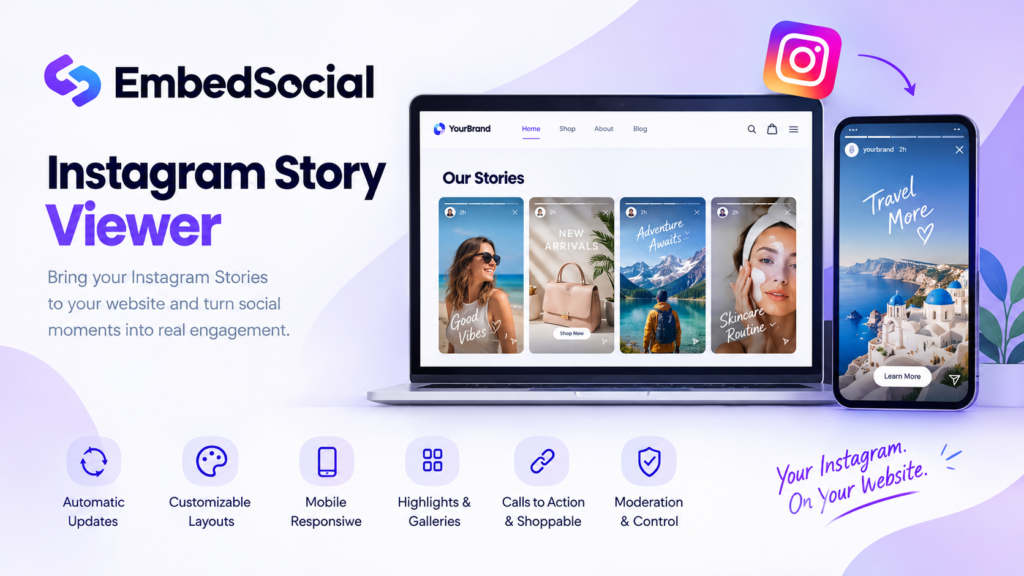
EmbedSocial offers several features intended to help businesses present Instagram Stories in a more organized and useful way. The exact features available depend on the current product and subscription plan.
Automatic Story Updates
One of the main advantages is automatic content synchronization. Instead of manually copying every new Story into a website, users can connect their Instagram source and allow the integration to update eligible content.
This is particularly useful for businesses that publish Stories frequently. Restaurants, online stores, event organizers, and content creators can keep their websites aligned with their latest social media activity while reducing repetitive maintenance.
Automatic updates still depend on account permissions, integration availability, and the platform’s synchronization schedule. Website owners should test their widget after setup to confirm that content appears as expected.
Customizable Widget Layouts
A website widget should complement the surrounding content rather than look like an unrelated advertisement. EmbedSocial provides templates and design controls that help users adjust the presentation to their brand.
Depending on the selected configuration, users may be able to choose layouts, modify visual styling, and customize the widget using supported design options. Advanced customization can be particularly valuable for businesses with established brand guidelines.
A consistent appearance can make the Stories section feel like a natural part of the website. However, users should avoid excessive animations, oversized widgets, or distracting colors that interfere with the main page content.
Mobile-Responsive Design
Many visitors access websites through smartphones, so a Stories widget needs to remain usable on smaller screens. EmbedSocial promotes mobile-responsive layouts intended to adapt to different screen sizes.
A mobile-friendly widget can make it easier for visitors to tap through visual content without opening another application. Website owners should still test the published widget on several devices because the final experience can depend on the theme, page layout, and embedding method.
Instagram Highlights and Story Galleries
EmbedSocial also provides options for presenting Stories in formats such as Highlights-style widgets and Story Galleries. These features can help businesses organize visual content into a more accessible presentation.
For example, a travel company might showcase destinations, customer experiences, and travel tips. A beauty brand could organize content around product demonstrations, tutorials, and launches.
These formats can make social content easier to explore. Their usefulness depends on the available source content and the configuration selected by the website owner.
Calls to Action and Shoppable Stories
For commercial websites, interactive content can do more than attract attention. EmbedSocial promotes features that may allow users to add calls to action, links, or shopping-related elements to supported Story presentations.
An online store could use an appropriate call to action to direct visitors toward a product page. A service business might guide potential customers to a booking page or contact form.
The available options and their requirements should be checked before implementation. A call to action can support the customer journey, but it does not guarantee purchases, leads, or higher conversion rates.
Content Moderation and Control
Businesses often need control over which content appears on their websites. EmbedSocial describes moderation tools that let users select or manage Stories displayed in their widgets.
This can help keep a website focused on relevant campaigns, products, and announcements. Before publishing a widget, users should review its content and confirm that the selected Stories are appropriate for the intended audience.
Moderation is particularly important for businesses with multiple campaigns or frequently changing social media content.
Multiple Website Integrations
Another useful feature is the ability to display Stories across supported website platforms. EmbedSocial lists integrations for platforms such as WordPress, Shopify, Wix, Squarespace, Webflow, and other compatible website builders.
This can help businesses maintain a consistent social media presence across different digital properties. Agencies managing several websites may also find the centralized widget approach useful, subject to the limits and conditions of their chosen subscription.
🔗 You may also like: What Is Sosoactive? Exploring the Digital Media Platform
🔗 You may also like: What Is Bumpdots.com? A Look at Its Digital Media Coverage
Benefits of Using EmbedSocial Instagram Story Viewer
1. Bring Social Media Content to Your Website
A business may publish useful content on Instagram that website visitors never see. Displaying Stories on relevant pages creates another opportunity for people to discover updates, product demonstrations, announcements, and behind-the-scenes material.
This approach can make a website feel more current while connecting the business’s social presence with its main online destination.
2. Reduce Manual Content Management
Manually downloading and uploading social media content can consume time, particularly when a business publishes new Stories every day. An integration that automatically synchronizes eligible content can reduce repetitive work.
Website managers can spend more time planning campaigns, improving product pages, and answering customer questions instead of rebuilding the same visual content in multiple places.
3. Support Product Discovery
For e-commerce businesses, Stories can provide a visual way to introduce products, demonstrate their use, and communicate seasonal promotions. When suitable links or shopping features are available, visitors can move from discovering an item to exploring its product page.
This creates a more connected experience between social content and the online store. Results will depend on product relevance, presentation quality, website usability, and the strength of the offer.
4. Strengthen Brand Consistency
Businesses often use different channels to communicate with customers. Displaying Instagram Stories on a website can help connect these channels and create a more consistent brand experience.
For example, a company can feature campaign announcements, event coverage, new releases, or educational content in both social media and relevant website sections.
The key is to select content that supports the page’s purpose rather than displaying every available Story without considering its relevance.
5. Encourage Further Engagement
An interactive Stories widget can give visitors another way to explore a brand’s content. Visitors who discover useful or entertaining Stories may become interested in following the Instagram account or exploring other pages on the website.
However, an embedded widget should support the website’s primary goal. It should not distract visitors from important information, slow down the page unnecessarily, or make navigation more complicated.
How to Add EmbedSocial Instagram Story Viewer to Your Website
The exact interface may change, but the general setup process follows a straightforward workflow.
Step 1: Create an EmbedSocial Account
Visit the official EmbedSocial Instagram Stories widget page and review the available options. Create an account and select the appropriate plan or trial, depending on your requirements.
Before choosing a plan, check the current pricing, feature availability, and usage limits.
Step 2: Connect Your Instagram Source
Follow the platform’s instructions to authorize the Instagram account you want to use. If the integration requires a connected Facebook Page or additional permissions, complete those steps using the appropriate account.
Make sure you are connecting the correct business or creator profile and that you have permission to manage it.
Step 3: Create and Customize Your Widget
Select the Instagram Stories widget and configure its presentation. Choose a layout that suits the website, review the available design controls, and select the content you want visitors to see.
Keep the widget visually consistent with your website. Test any links or calls to action before publishing them.
Step 4: Copy the Embedding Code
When the widget is ready, use the platform’s provided embedding option. Depending on your website builder, you may receive JavaScript code, an iframe option, or another supported method.
Copy the code exactly as provided. Avoid changing technical elements unless you understand how those changes may affect the widget.
Step 5: Add It to Your Website
Open the page where you want the Stories to appear and add the embed using the appropriate editor.
For WordPress, you can generally use a Custom HTML block or the supported EmbedSocial plugin and shortcode method. Other website builders may provide an embed or custom-code element.
Save or publish the page, then check that the widget loads correctly.
Step 6: Test the Published Widget
Open the live page on desktop and mobile devices. Check the layout, loading behavior, navigation, and any linked buttons.
If the Stories do not appear, review account authorization, the embed code, website-builder restrictions, and any relevant platform limits. You may also need to consult EmbedSocial’s documentation or support team.
EmbedSocial Instagram Story Viewer Pricing
Pricing is an important consideration when deciding whether to use a third-party widget. EmbedSocial offers different subscription levels, and the features and usage limits depend on the plan.
At the time of checking its official pricing page, EmbedSocial listed the following monthly prices for its main paid plans:
- Pro: $29 per month.
- Pro Plus: $49 per month.
- Premium: $99 per month.
These prices may change, and billing terms or promotional offers can affect the final cost. Check the official EmbedSocial pricing page before making a purchase.
The plans also differ in their source limits, monthly widget views, media allowances, and update frequency. The free plan has more limited usage, while paid options provide higher limits and additional capabilities.
A small website with limited traffic may have different requirements from an online store or agency managing several brands. Estimate how many pages will contain the widget and how frequently visitors will load those pages before selecting a subscription.
Is EmbedSocial Instagram Story Viewer Safe to Use?
EmbedSocial is designed to connect social media sources with website widgets through supported integrations. Nevertheless, website owners should evaluate any third-party service before granting account access or adding external code to their websites.
Start by visiting the official domain and reviewing its privacy policy, terms, and account authorization process. Use the permissions requested by the platform as a guide, and avoid sharing account credentials directly with websites that are not part of the official authorization process.
It is also sensible to review the widget’s impact on website performance and privacy. Third-party embeds may involve external requests, so consider whether the widget is appropriate for pages that collect personal information or contain sensitive content.
Finally, remember that an embedded Story widget is not the same as an anonymous Instagram Story viewer. It is intended to display eligible connected content on a website, not to provide unrestricted access to private accounts or bypass Instagram’s privacy controls.
Limitations to Consider Before Using EmbedSocial
Although the platform offers useful features, it may not be suitable for every website.
Subscription costs: Advanced features and higher usage limits may require a paid plan. Businesses should compare the cost with their actual needs before committing.
Account connection requirements: The widget depends on a supported and authorized Instagram integration. Account permissions or platform changes may affect content availability.
Usage limits: Subscription plans can limit sources, monthly widget views, and imported media. Websites with growing traffic should monitor their usage to avoid exceeding plan limits.
External dependency: The widget relies on EmbedSocial and its integration with Instagram. If the service, account connection, or external scripts experience problems, the displayed content may be affected.
Performance considerations: Additional third-party code can influence page loading and rendering. Test the widget and monitor important performance metrics after installation.
Content suitability: Not every Instagram Story is appropriate for every website page. Select content carefully and review it regularly to keep the widget relevant and professional.
Understanding these limitations helps businesses make a more informed decision and avoid expecting the widget to solve every social media or website engagement challenge.
Who Should Use EmbedSocial Instagram Story Viewer?
EmbedSocial may be useful for several types of users.
E-commerce stores can display product-related Stories, launches, and demonstrations alongside relevant products or category pages.
Small businesses can bring announcements, customer-facing updates, and behind-the-scenes content to their websites without manually recreating every post.
Digital marketing agencies can use supported integrations to help clients present social content across their digital properties.
Creators and personal brands can connect their website with their Instagram presence and give visitors another way to explore their content.
Event organizers and travel businesses can showcase relevant experiences, event updates, destinations, and visual highlights.
The tool is most valuable when Instagram Stories provide useful information or context for the website visitor. If the content is rarely updated or does not support the page’s purpose, a widget may add complexity without delivering meaningful value.
Conclusion
The EmbedSocial Instagram Story Viewer is a website widget designed to bring Instagram Stories into a business’s online presence. Its main strengths include automatic content synchronization, customizable layouts, mobile-responsive presentation, moderation options, and compatibility with several popular website platforms.
It can be especially useful for businesses that already publish engaging Instagram content and want to make that content available to website visitors. E-commerce stores, service providers, agencies, and creators may benefit from connecting their social media activity with relevant website pages.
However, the service should not be confused with anonymous Instagram Story viewing tools. Its primary purpose is to display eligible connected Stories on a website, and its usefulness depends on the user’s account setup, subscription, content strategy, and website requirements.
Before choosing EmbedSocial, review the current features, pricing, permissions, and usage limits. Test the widget on your website, monitor its performance, and make sure it improves the visitor experience. Used thoughtfully, it can be a practical way to connect social media storytelling with a business website.
FAQs
What is EmbedSocial Instagram Story Viewer?
It is a widget that lets users display eligible Instagram Stories on a website. It is designed primarily for businesses and website owners who want to integrate social content into their pages.
Can I use EmbedSocial Instagram Story Viewer on WordPress?
Yes. EmbedSocial provides a WordPress integration that supports methods such as embedding code or using its plugin and shortcodes. The available method depends on your setup.
Is EmbedSocial Instagram Story Viewer free?
EmbedSocial lists a free plan with limited usage, as well as paid plans. Instagram Stories features and advanced options may depend on the current plan, so check the official pricing page.
Does EmbedSocial automatically update Instagram Stories?
EmbedSocial states that its supported Instagram integration can synchronize Stories automatically. Actual availability depends on account authorization, integration conditions, and the service’s update schedule.
Can EmbedSocial help me view private Instagram Stories anonymously?
No. The widget is designed to display authorized content on websites. It should not be treated as a tool for bypassing private-account restrictions or anonymously accessing content that you are not authorized to view.